Energized Electrical Work Permits
in Under 60 Seconds
Speak or type the job description. AI understands the electrical details — panel name, voltage, arc flash values, PPE — and fills every NFPA 70E field automatically. You review, correct if needed, and download.
No credit card to start · $4.99/permit after free tier
From Briefing to Signed Permit in 3 Steps
The same information you'd say at the job briefing — that's all ArcDocs needs.
Describe the Job
Record a voice memo or type a description. Include the panel name, voltage, arc flash label values, worker names — anything from the arc flash study label.
AI Extracts All Fields
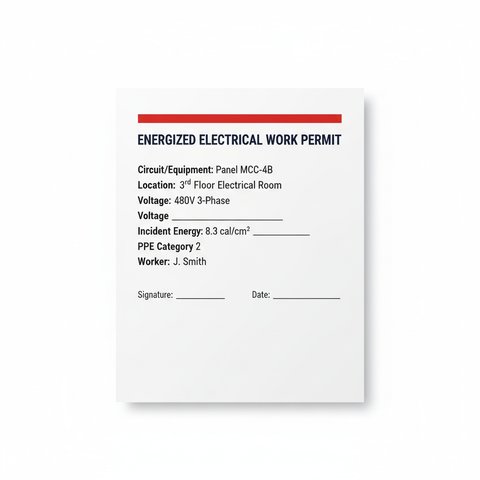
Every detail is mapped to the correct NFPA 70E field — incident energy, approach boundaries, PPE category, justification. Uncertain values are flagged for your review.
Download & Sign
Print the professional PDF. Verify all values, obtain authorization signatures, and file per your document retention policy. OSHA and NFPA 70E compliant format.
All 9 Elements Required by NFPA 70E 130.2(B)(1)
AI extracts and formats every mandatory field from your voice or text — nothing gets missed.
Simple, Transparent Pricing
Start free. No credit card required. Cancel anytime.
- 3 permits, never expire
- Voice + text input
- PDF download
- ArcDocs watermark
- 20 permits per month
- Voice + text input
- No watermark
- 30-day permit history
- Priority support
- 75 permits per month
- Company name on permits
- No watermark
- Priority support
Occasional use? Pay $4.99 per individual permit — no subscription needed.
Common Questions
Does ArcDocs replace an arc flash study? +
Is the output NFPA 70E 130.2(B)(1) compliant? +
Who is this for? +
What happens to my data? +
Can I use voice input on a job site? +
What if the AI gets a field wrong? +
Stop Spending 20 Minutes on a Permit Form
Describe the job once — the same way you'd brief the crew — and have a signed permit in your hand before the first tool touches the panel.
Generate Your First Permit FreeNo credit card · 3 free permits · Cancel anytime